Introducing RevPro: Revolutionizing Systematic Reviews and Meta-Analyses
 by Shemsedin A
Discover how RevPro transforms the complexity of systematic reviews and meta-analyses into an intuitive and collaborative workflow, designed for researchers by researchers.
Session 2.5: Introduction to Systematic Review Software
2.5.1 Why Use Software for Systematic Reviews?
Systematic reviews are methodologically intensive, requiring coordination across multiple reviewers, management of hundreds or thousands of records, and transparent documentation of decisions. Software platforms address key challenges:
Centralized libraries with deduplication
Role-based access, assignment tracking
Audit trails, version control, PRISMA documentation
Dual-reviewer workflows, conflict resolution
AI-assisted screening and query building
2.5.2 Types of Systematic Review Software
Covidence, Rayyan, RevProHub
Title/abstract/full-text screening, data extraction
EndNote, Zotero, Mendeley
Citation storage, deduplication, formatting
RevMan, JBI SUMARI, R (meta)
Statistical synthesis, forest plots
RevProHub, DistillerSR, EPPI-Reviewer
End-to-end: protocol to publication
2.5.3 Key Features to Evaluate When Choosing Software
- Collaboration support (real-time, role-based)
- AI assistance (query building, screening prioritization)
- Reporting tools (PRISMA diagrams, export options)
- Cost & accessibility (free vs. subscription, offline availability)
- Standards alignment (Cochrane, JBI, PRISMA compliance)
Current AI capabilities include: query refinement (PICO to database syntax), screening prioritization, data extraction assistance (identifying outcomes in PDFs), and conflict prediction.
2.5.5 RevProHub in the Software Landscape
RevProHub is a free, full-service platform developed for the Ethiopian evidence synthesis community. It combines end-to-end workflow management (Planning → Conducting → Reporting), AI-assisted query building and chat refinement, mediator role for conflict resolution, 1‑to‑many repeater logic for qualitative synthesis, and automated PRISMA 2020 + Risk of Bias visualizations.
In small groups, discuss:
1️⃣ What software (if any) have you used for literature reviews?
2️⃣ What was the biggest challenge you faced?
3️⃣ What features would be most valuable for your current work?
Session 2.6: Introduction to RevProHub Software
2.6.1 What is RevProHub?
RevProHub is a free, comprehensive web‑based platform supporting any systematic review or evidence synthesis project end‑to‑end. Core features: project creation & planning, protocol versioning, AI‑assisted search query builder, dual‑reviewer screening with conflict resolution, flexible data extraction (including repeater fields for qualitative data), meta‑analysis, automatic PRISMA 2020 diagrams, manuscript editor with auto‑injected findings, WBS/Gantt, and collaboration hub.

2.6.2 Registration & Account Setup

2.6.3 The Navigation Ecosystem: Context-Aware Sidebar
The platform uses a Context-Aware Sidebar — navigation options adapt whether you are on the global dashboard or inside a specific project.
View all projects, track personal tasks, read announcements.
Mission Control: live stats (screening progress, pending conflicts, library totals).

2.6.4 Creating a New Project
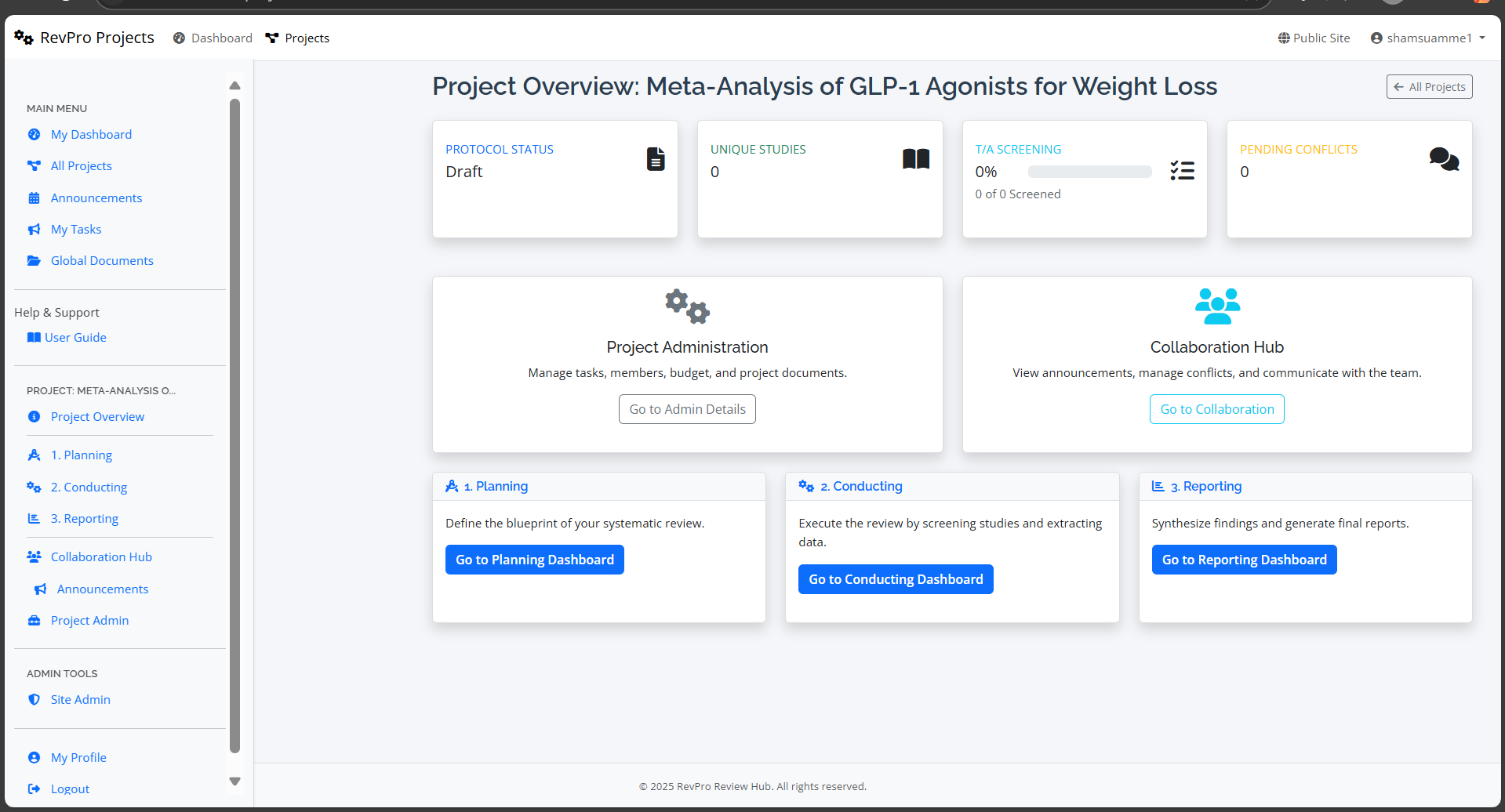
2.6.5 The Three Core Workflow Phases
Protocol, research questions, search strategy, QA forms, extraction forms.
Studies library, deduplication, screening, quality appraisal, data extraction.
PRISMA diagram, data synthesis, report generator, manuscript editor.
2.6.6 Members & Access Control (Roles + Mediator)
Add team members: navigate to Members & Access → Invite Member → assign role.

2.6.7 Project Dashboard: Key Stats Cards
Navigation cards directly open Planning, Conducting, or Reporting dashboards.
2.6.8 Help & Support
Detailed step‑by‑step documentation via left sidebar.
Submit tickets or book technical support sessions.
- Register for RevProHub (or log in).
- Create a new project titled: "[Your Name] Pilot Review" – select a project type of your choice.
- Navigate to Members & Access and invite a partner (assign as Reviewer).
- Observe how the sidebar menu changes when you enter the project context.
- Navigate to Planning → Research Questions & Eligibility and note where inclusion frameworks are stored.
- Return to the Project Dashboard and identify the three‑phase navigation cards.
Debrief questions:
- What information is displayed on the stats cards?
- How does the Mediator role differ from Reviewer?
- Where would you go to export all screening decisions?
- In which phase (Planning/Conducting/Reporting) would you develop data extraction forms? Why?
Additional: Mediator vs. Traditional Senior Reviewer & Export Center
The Mediator in RevProHub is assigned only to specific studies in conflict, ensuring focus and preventing unnecessary authority over all decisions. In contrast, traditional "senior reviewer" often has blanket authority. Data extraction forms are created during the Planning phase (to pre‑specify variables). The Export Center (Project Settings) allows downloading screening decisions, PRISMA data, RoB tables, and the full study library in multiple formats.

📌 Module 2 Reflection & Integration
- How do structured frameworks (PICO/PICo/PCC) improve the precision of a review question?
- Why is protocol registration (PROSPERO/OSF) essential for credibility?
- What advantages does a full‑service platform like RevProHub offer over disconnected tools?
- Explain the practical benefit of the “Mediator” role in reducing bias during screening conflicts.
Next steps: After mastering RevProHub navigation, participants will advance to protocol drafting and structured search translation using AI‑powered tools inside the Planning phase.