Search & Query Management | RevProHub
 by Shemsedin Amme
Published on August 27, 2026
Session 2.6.10: Search & Query Management
AI Builder + Chat Refinement
Refinement Chat Room
90 min (lecture + hands-on)
10+ Database Translation
🚀 Key Features: Full AI Integration
Unlike traditional tools where syntax translation is manual or "not fully automatic," RevProHub now features an AI-Powered Query Builder and an interactive Refinement Chat Room that allows you to iteratively improve your searches using natural language. The AI translates your PICO/PICo framework into validated syntax for PubMed, Scopus, Embase, Web of Science, CINAHL, Cochrane, LENS, HINARI, and more.
Unlike traditional tools where syntax translation is manual or "not fully automatic," RevProHub now features an AI-Powered Query Builder and an interactive Refinement Chat Room that allows you to iteratively improve your searches using natural language. The AI translates your PICO/PICo framework into validated syntax for PubMed, Scopus, Embase, Web of Science, CINAHL, Cochrane, LENS, HINARI, and more.
📌 Search & Query Management Dashboard
Navigate to Planning → Search & Query Management. This dashboard centralizes everything: from building master queries to translating across databases and executing searches.
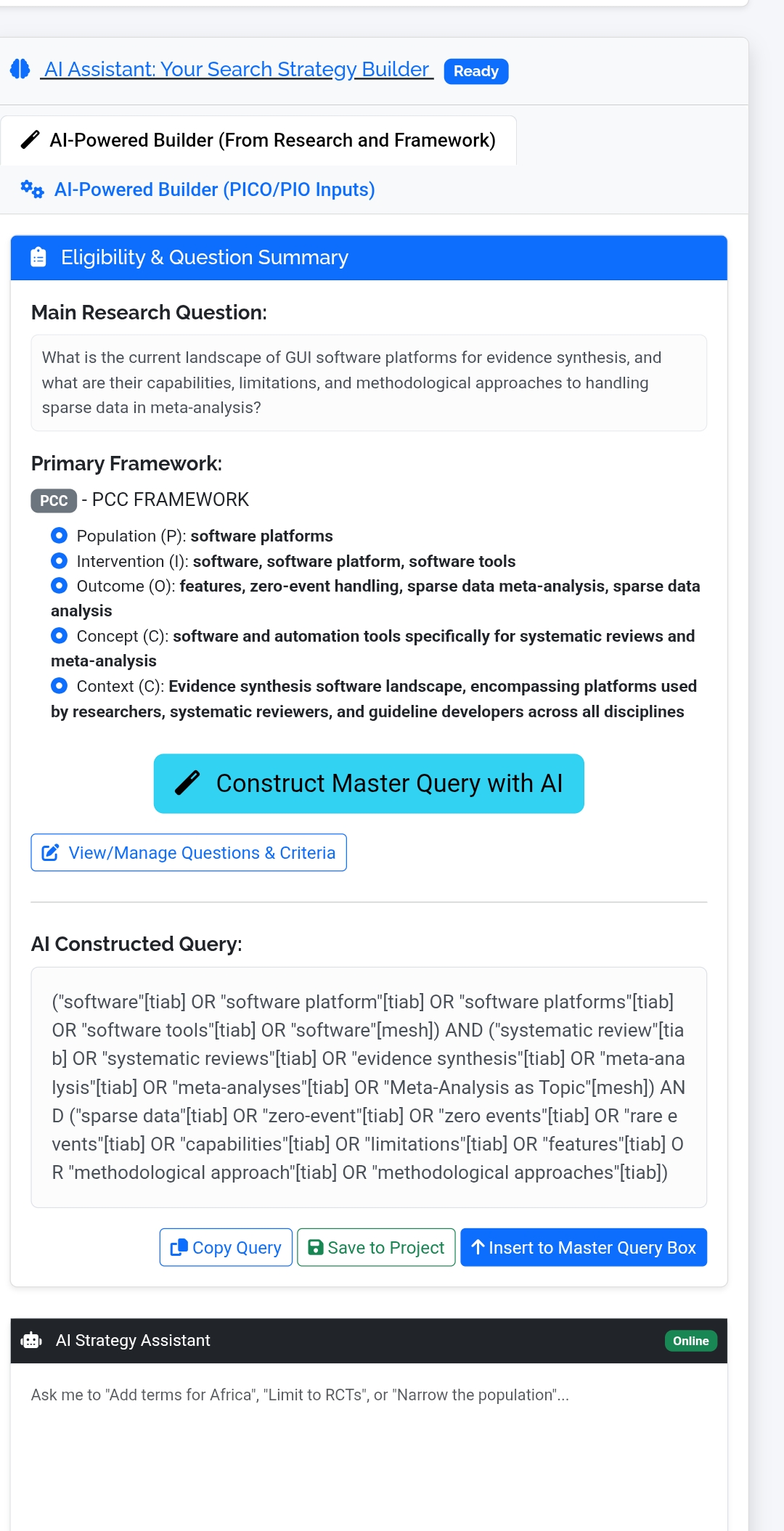
Your Eligibility & Research Question Summary
Main Research Question: What is the impact of beta agonist agents towards weight reduction among diabetic patients?
Primary Framework: PICO - Pico
- Population (P): Patients
- Intervention (I): Beta agonist
- Comparator (C): Standard treatment
- Outcome (O): Weight reduction
This eligibility framework is automatically fed into the AI Strategy Assistant – no manual re-entry needed.
📋 Default Strategy – Auto-Injected Queries
#1: Master Query (Planning AI)
Source: Planning AI Built | Saved: Apr 6, 2026, 05:05 PM
Source: Planning AI Built | Saved: Apr 6, 2026, 05:05 PM
("diabetes mellitus"[mesh] OR "diabetic patients"[tiab] OR "diabetes"[tiab] OR "diabetics"[tiab]) AND ("beta-adrenergic agonists"[mesh] OR "beta agonist*"[tiab] OR "beta-adrenergic agonist*"[tiab] OR "beta-agonist*"[tiab] OR "beta-adrenoceptor agonist*"[tiab]) AND ("weight loss"[mesh] OR "weight reduction"[tiab] OR "weight loss"[tiab] OR "body weight changes"[tiab] OR "body mass index"[tiab] OR "BMI"[tiab] OR "obesity"[tiab])
Search Performance: Database: pubmed | Total Found: 55 | Last Executed: Apr 6, 2026, 05:09 PM
#2: PubMed (AI Translated)
Source: AI Translated | Saved: Apr 6, 2026, 05:07 PM
Source: AI Translated | Saved: Apr 6, 2026, 05:07 PM
("diabetes mellitus"[MeSH Terms] OR "diabetic patients"[Title/Abstract] OR "diabetes"[Title/Abstract] OR "diabetics"[Title/Abstract]) AND ("beta-adrenergic agonists"[MeSH Terms] OR "beta agonist*"[Title/Abstract] OR "beta-adrenergic agonist*"[Title/Abstract] OR "beta-agonist*"[Title/Abstract] OR "beta-adrenoceptor agonist*"[Title/Abstract]) AND ("weight loss"[MeSH Terms] OR "weight reduction"[Title/Abstract] OR "weight loss"[Title/Abstract] OR "body weight changes"[Title/Abstract] OR "body mass index"[Title/Abstract] OR "BMI"[Title/Abstract] OR "obesity"[Title/Abstract])
No execution summary recorded – ready to execute.
AI Strategy Assistant & Refinement Chat Room
AI Strategy Assistant ● Online
Ask me to refine your search: "Add terms for Africa", "Limit to RCTs", "Narrow the population", "Exclude pediatric studies"…
Ask me to refine your search: "Add terms for Africa", "Limit to RCTs", "Narrow the population", "Exclude pediatric studies"…
Refinement Chat Room – Iterative Improvement
Type natural language requests (e.g., "Restrict to studies published after 2018" or "Add 'glucagon-like peptide-1' as an alternative intervention"). The AI instantly updates the master query and shows differential changes. This closed-loop refinement ensures your search evolves based on real performance metrics.
Type natural language requests (e.g., "Restrict to studies published after 2018" or "Add 'glucagon-like peptide-1' as an alternative intervention"). The AI instantly updates the master query and shows differential changes. This closed-loop refinement ensures your search evolves based on real performance metrics.
💬 Example user input: "Add search terms for 'low-income settings' and limit to RCTs"
🤖 AI response: Updated query:
🤖 AI response: Updated query:
... AND ("randomized controlled trial"[pt] OR "RCT"[tiab]) AND ("developing countries"[mesh] OR "low-income"[tiab])
The Refinement Chat Room remembers your framework and prior iterations, allowing real-time collaborative tuning – a major upgrade from static query building.
Query Builder & Translator (Full Suite)
The platform provides two integrated methods: AI-Powered Translator (recommended for accuracy + speed) and Rule-Based (Regex) Translator as fallback.
Step 1: Build Master Query
1 Use the Short Form Builder to add terms with field tags (MeSH Term, Title/Abstract, Text Word, Author). Combine with AND/OR/NOT.
2 Click “Build Master Query” to generate the string, or directly paste/edit in the Master Query box.
3 AI‑Powered Builder (From Research and Framework): One-click generation from your PICO/PICo eligibility criteria – creates a validated starting query.
PubMed
Scopus
Web of Science
Cochrane
CINAHL
PsycINFO
Embase
LENS
HINARI
Step 2: Translate & Export – AI-Powered (NEW)
AI-Powered Translator (Fully Automatic)
Unlike older systems where translation required manual syntax adjustment, RevProHub’s AI automatically converts your master query into the precise syntax for 10+ databases, including field mapping (MeSH ↔ Emtree), capitalization rules (LENS.org), and proximity operators. Each translated query appears with copy, download, and save options.
Unlike older systems where translation required manual syntax adjustment, RevProHub’s AI automatically converts your master query into the precise syntax for 10+ databases, including field mapping (MeSH ↔ Emtree), capitalization rules (LENS.org), and proximity operators. Each translated query appears with copy, download, and save options.
Step 3: Execute Database Search
1 Select a database (e.g., PubMed).
2 Paste the translated query (or use the "Use for Search" button from a translated card).
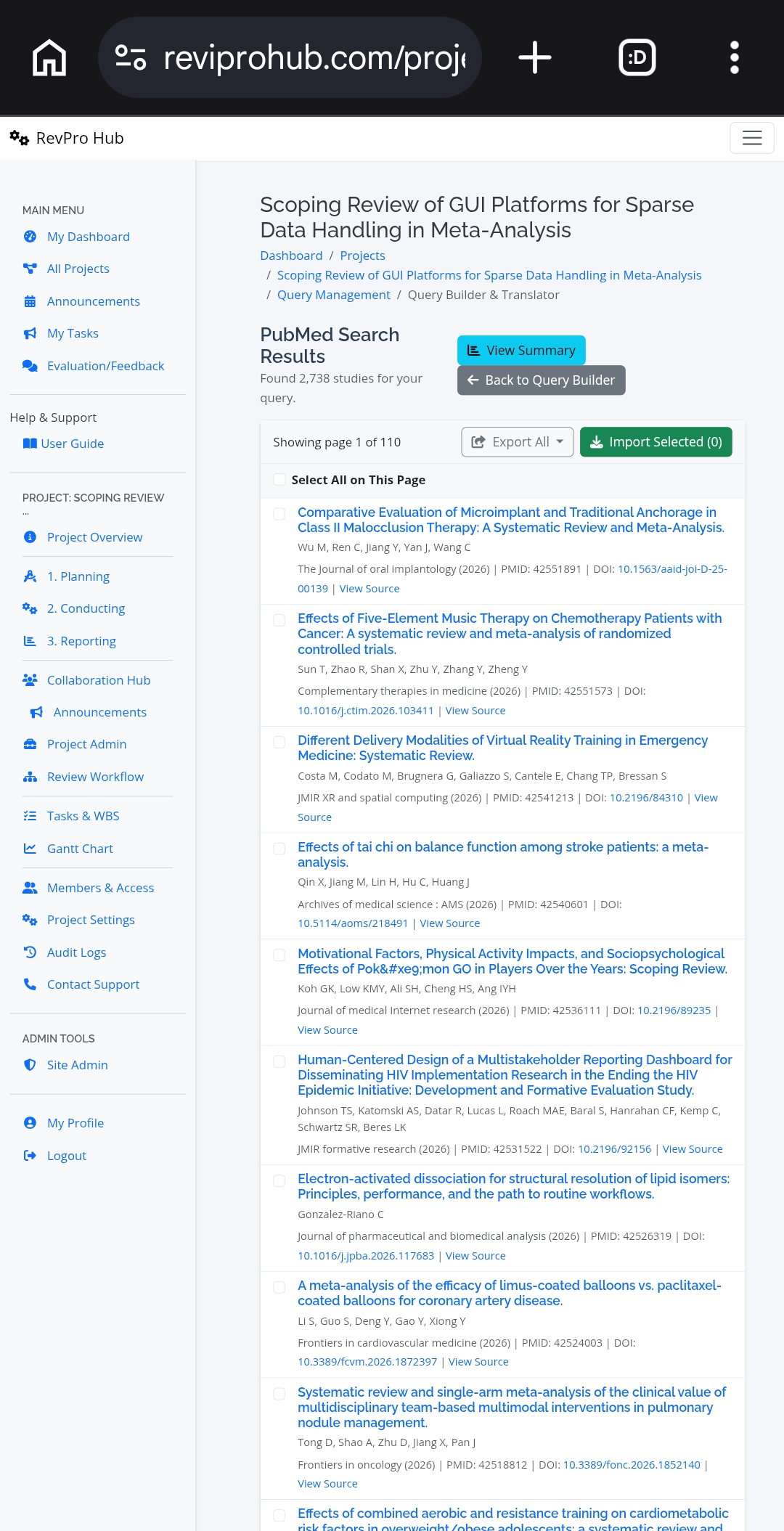
3 Click “Execute Search” – results appear with paginated list: title, authors, journal.
4 Select studies via checkboxes and click “Import” to add to your project library.
For large result sets, the Search Results Summary provides analytics: Publications by Year, Top Journals, Top Keywords, and Publication Types – helping you refine further using the chat room.
Project Saved Queries & History
| # | Saved Query | Source | Saved At | Actions |
|---|---|---|---|---|
| 1 | (mesh_term.mesh_heading:("Diabetes Mellitus") OR ... | ai_translated | 4/6/2026, 8:07:42 PM | |
| 2 | ("diabetes mellitus"[MeSH Terms] OR ... | ai_translated | 4/6/2026, 8:07:40 PM | |
| 4 | ("diabetes mellitus"[mesh] OR "diabetic patients"[tiab] ... | planning_ai_built | 4/6/2026, 8:05:41 PM |
Click Load to restore any saved query into the Master Query box for re‑translation or refinement via chat.
🧪 Hands-On Activity: AI-Powered Search Builder (30 min)
- Navigate to Search module: Within your project → Planning → Search & Query Management.
- Review auto-injected framework: Verify your PICO/PICo eligibility from previous session appears in the Eligibility Summary.
- Generate master query using AI: Click “AI-Powered Builder (From Research and Framework)” – observe how the system populates the Master Query box using field tags.
- Open Refinement Chat Room: Type a refinement request: e.g., “Limit to studies published between 2018-2025” or “Add ‘liraglutide’ as an alternative intervention”. Watch the AI update the query string dynamically.
- Translate to multiple databases: In the translator section, select PubMed, Embase, and Scopus. Click AI-Powered Translate. Review the three translated queries – note syntax differences (MeSH vs Emtree).
- Execute a search in PubMed: Copy the translated PubMed query → paste in “Execute Database Search” → click Execute. Review results count and import the first 5 records into your library.
- View Search Summary: Click “View Results Summary” – examine the year distribution and top journals. Use the chat room to ask: “What keywords appear most frequently in excluded studies?”
Debrief & discussion:
- How does the Refinement Chat Room differ from traditional iterative editing of search strings?
- What is the advantage of automatic syntax translation across 10+ databases?
- How can the Search Results Summary (publication year, top keywords) inform further refinement before final study import?
Complete Search Workflow
1️⃣ Eligibility Framework (PICO)
➡️
2️⃣ AI Master Query Builder
➡️
3️⃣ Refinement Chat Room (Iterative)
➡️
4️⃣ AI Translation (10+ DBs)
➡️
5️⃣ Execute & Import
➡️
6️⃣ PRISMA‑ready documentation
Reproducibility guarantee: Every query version, translation, and chat refinement log is saved in the project history, ensuring full transparency for reporting in the final manuscript (appendices).
What changed from previous guides?
❌ Old: "Syntax translation is not fully automatic – workspace to manually adapt."
✅ New (RevProHub): AI‑Powered Query Builder + Refinement Chat Room + fully automatic translation to 10+ databases. The AI suggests improvements based on search performance metrics, dramatically reducing time and error.
❌ Old: "Syntax translation is not fully automatic – workspace to manually adapt."
✅ New (RevProHub): AI‑Powered Query Builder + Refinement Chat Room + fully automatic translation to 10+ databases. The AI suggests improvements based on search performance metrics, dramatically reducing time and error.